


Aptlogica’s recently launched Sereni LRS is an enterprise-grade, xAPI-compliant Learning Record Store built to help organizations collect, manage, and analyze learning data at scale. It currently processes 18.7B+ xAPI statements and tracks more than 2M learners, with a query response time of under 250 ms and 99.9% platform availability.
At this scale, an LRS is not just about storing learning records. Teams also need practical ways to protect learner data, move historical records between platforms, and connect learning activity with the systems they already use.
That’s what this latest Sereni LRS release focuses on.
We’ve added five new capabilities across privacy, migration, and automation, giving teams more control over learner data, easier migration options, and new ways to act on learning events.
What's New in Sereni LRS?
This release introduces five capabilities across three key areas:
- Privacy & Compliance
- LRS Migration
- Automation with Triggers & Webhooks
Let’s look at each one.
1. Easy LRS Migration:
- Learning Locker Migration:
The Learning Locker migration utility is designed to bring historical xAPI statements from an existing Learning Locker environment into Sereni LRS. Sereni’s documented migration process uses a dedicated MongoDB import utility to preserve historical learning data and reduce the manual effort involved in moving it.
For L&D and learning technology teams, the benefit is continuity. A move to Sereni LRS can preserve the learning history needed for ongoing analytics instead of treating the new platform as an empty starting point.
Migration still requires planning. Teams should inventory stores, estimate data volume, decide how to validate record counts and integrity, and agree on a cutover process before moving production workloads.
- SQL LRS Migration:
Sereni LRS also introduces a migration utility for organizations moving from Yet Analytics SQL LRS. It allows learning records from a SQL LRS database export to be transferred into Sereni LRS, helping teams retain their existing learning history when changing platforms
2. More Control Over Learner Data with the GDPR Toolkit
Learner data often contains personal information that organizations need to manage carefully.
With the new GDPR Toolkit, Sereni LRS gives administrators more control over learner information and makes it easier to respond to data-erasure requests.
Encrypted learner email addresses
Learner email addresses are now stored in encrypted form in the database and are decrypted only when the product needs to use them.
This adds an additional layer of protection for personal learner information while allowing Sereni LRS to continue using the data where required.
A simpler way to handle deletion requests
The new Forget Me utility allows a technical administrator to remove a learner’s records from Sereni LRS when required.
This includes:
- Statements
- Activity state
- Profile data
- Records across the relevant stores
Before deleting anything, administrators can also run a check-only report and export the data that is about to be removed.
3. Automate Learning Workflows with Triggers:
Sereni LRS Triggers allow administrators to monitor xAPI statements and run an action when selected conditions are met.
A Trigger is created for a specific LRS store. Administrators can start with events such as:
- Course started
- Course completed
- Course passed or failed
- Assessment completed
- Assessment passed
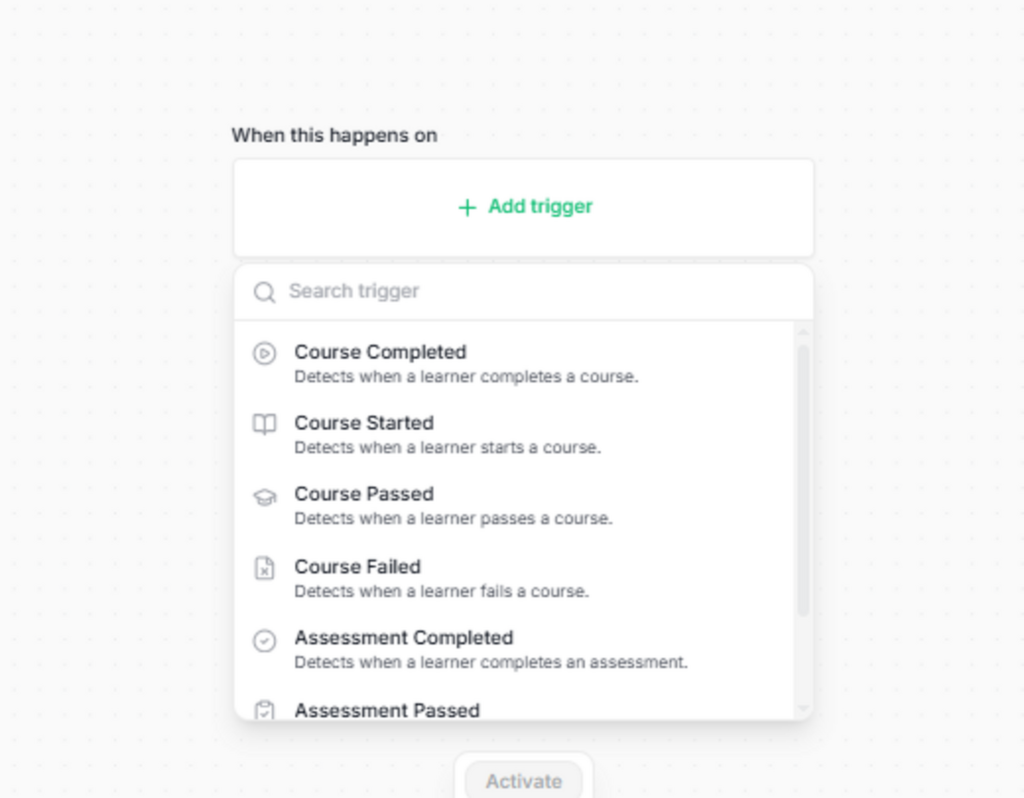
Rules can be refined using xAPI fields such as Actor, Verb and Object. Multiple conditions can be combined so the action runs only when all required criteria match.
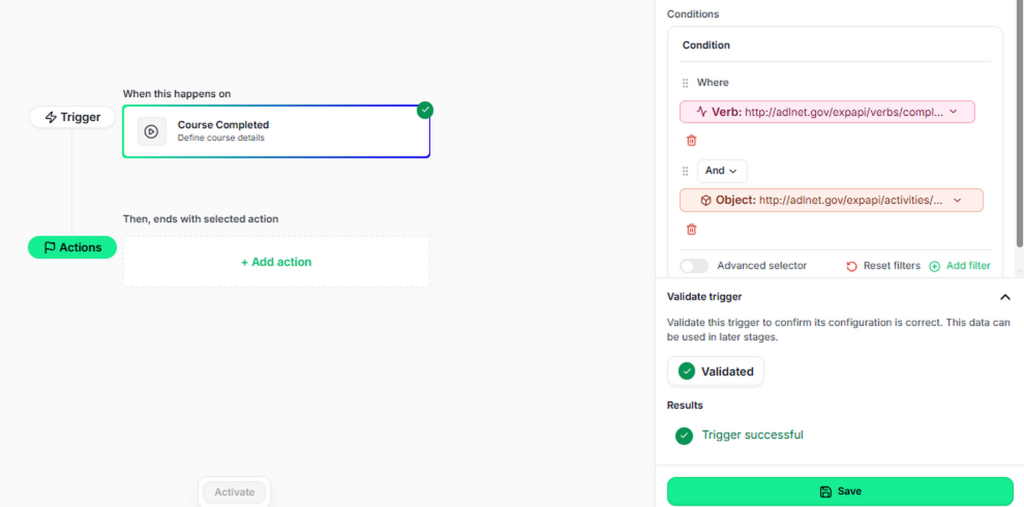
Before activation, administrators can validate the Trigger against available statement data. This confirms that the rule is configured correctly without starting the workflow.
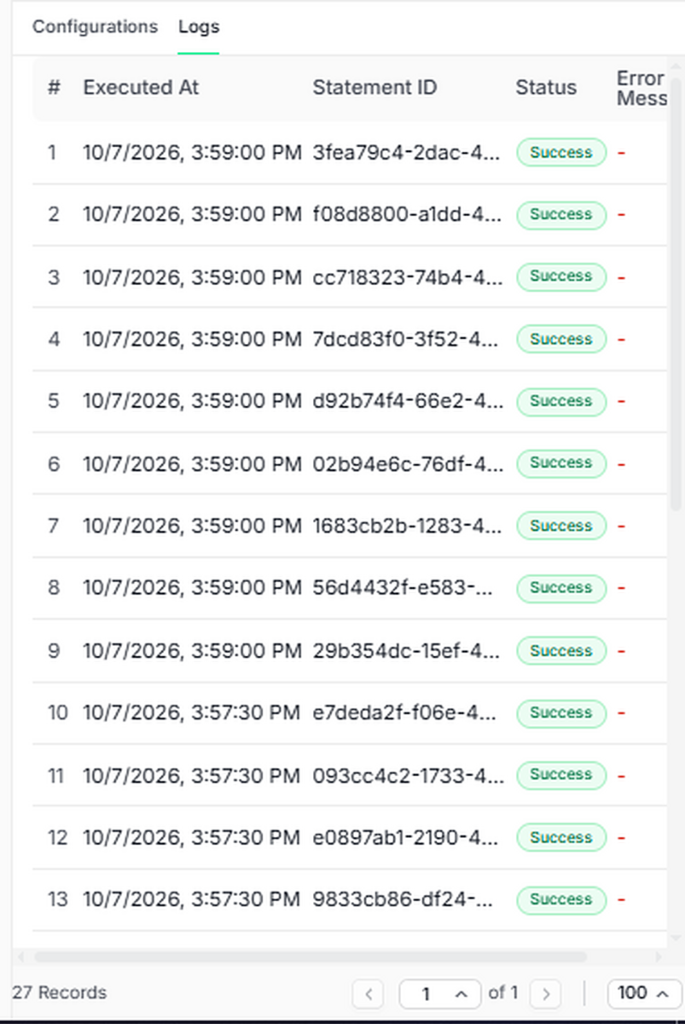
Triggers can be activated, deactivated or run manually. The interface also records execution status, matched statements and errors for troubleshooting.
Sereni LRS currently checks for matching statements every five minutes. Triggers support timely automation, but they should not be described as real-time event processing.
4. Send Personalized Email Actions:
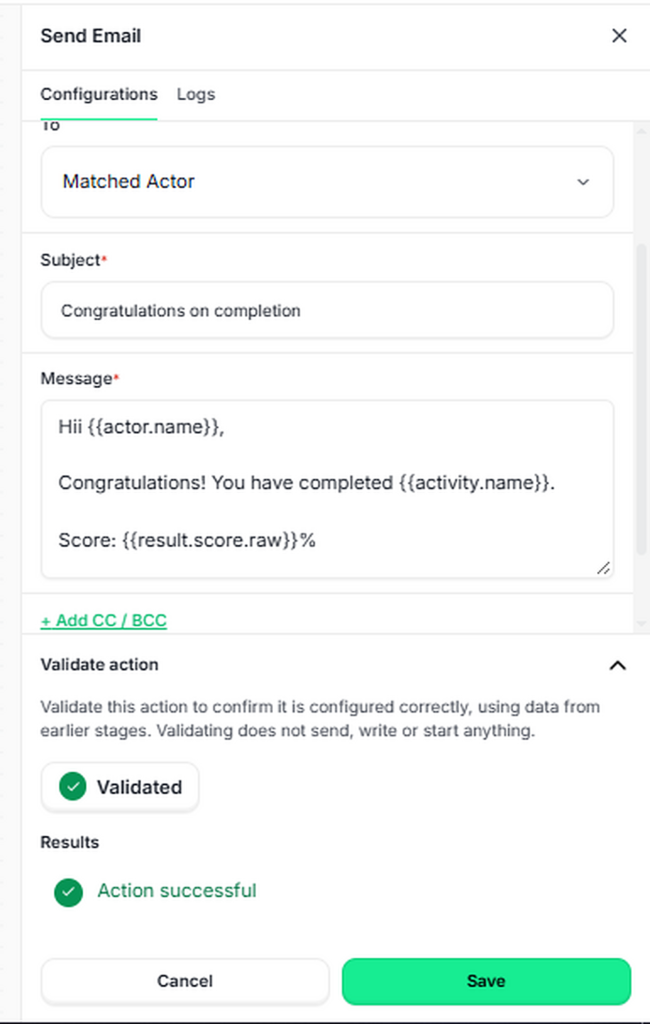
When a Trigger matches, Sereni LRS can send an email to the matched learner or another configured recipient.
Administrators can define the sender, recipient, subject and message. Email templates can include values from the matching statement, such as:
- Learner name
- Activity name
- Assessment score
Optional CC and BCC recipients can also be added.
For example, when a learner completes a course, Sereni LRS can automatically send a completion message containing the learner’s name, course name and score.
The email action can be validated before it is saved. Validation checks the configuration without sending the message.
5. Connect Learning Events to Other Systems with Webhooks
A webhook action sends selected information from a matching learning event to an external endpoint..
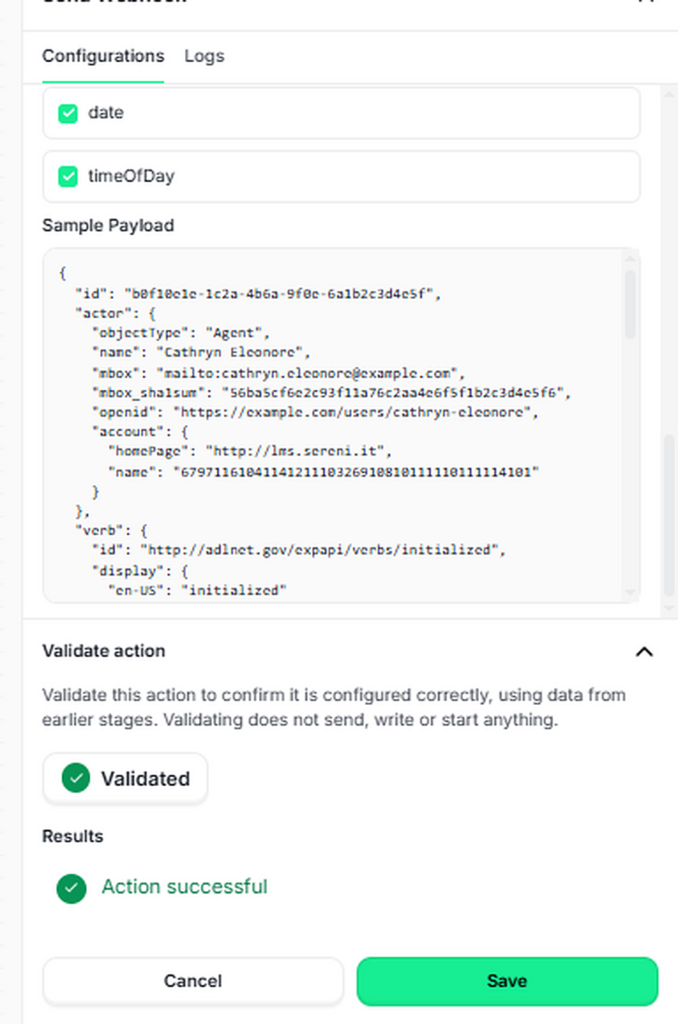
Administrators can configure the target URL and choose which xAPI fields to include, such as Actor, Verb, Object, Result, Context and Timestamp. Sereni LRS displays a sample payload so teams can inspect the data before activating the action.
A typical workflow could be:
Course completed → Trigger matches → Webhook sends event data → Receiving system starts its next process
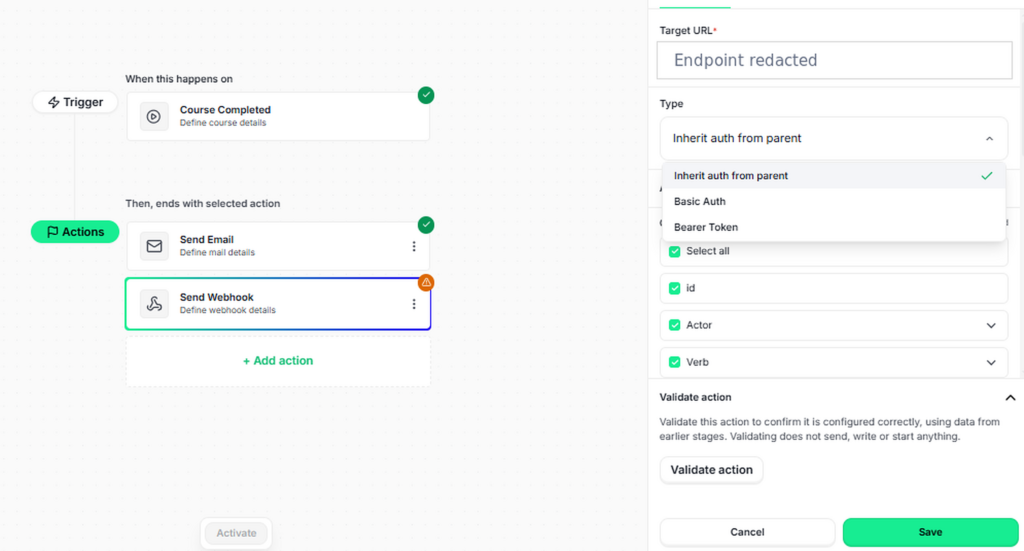
The interface provides a sample JSON payload and validates the action without sending, writing or starting anything. Teams can therefore check both structure and configuration before the workflow is activated.
After activation, webhook logs show the execution time, matching statement, status and error message for each run. This gives administrators a direct way to confirm successful deliveries and investigate failures
Put Learning Data to Work
With this release, Sereni LRS goes beyond collecting and analyzing xAPI statements. It helps teams protect learner information, retain learning history during migration and connect learning events with operational workflows.
Get started with Sereni LRS for FREE or contact sales@serenilrs.com to discuss migration and enterprise deployment.